Tuesday, October 16, 2012

A behind-the-scenes look at LinkedIn’s mobile engineering

Reference: http://arstechnica.com/information-technology/2012/10/a-behind-the-scenes-look-at-linkedins-mobile-engineering/

LinkedIn is the career-oriented social network that prides itself on professional excellence. But the company's original mobile offering was anything but—it left much to be desired. There was an iPhone application, but no support for Android or tablets. The backend was a rickety Ruby on Rails contraption; afflicted with seemingly insurmountable scalability problems. And despite serving only seven or eight percent of the LinkedIn population, the company's original mobile build required approximately 30 servers in order to operate. This was clearly not made to sustain a growing mobile user base.
Now, a little over a year has passed since LinkedIn relaunched its mobile applications and website. And the company recently marked the anniversary by debuting a number of new mobile features, including real-time notifications and support for accessing company pages from mobile apps.
Mobile is gradually becoming a central part of the LinkedIn landscape. The company says roughly 23 percent of its users access the site through one of its mobile applications, up from ten percent last year. As our friends at Wired reported last month, the underlying design language and development philosophy behind the company's mobile experience is playing an influential role as the company works to revamp its website.
No one knows more about this paradigm shift than Kiran Prasad, LinkedIn's director of mobile engineering. Prasad was one of the key players in LinkedIn's efforts to resurrect its mobile offerings, and he was kind enough to walk Ars through the process. LinkedIn's mobile man provided a behind-the-scenes look at how the company built its mobile applications and the associated backend infrastructure, while also describing the design strategy the company used to build its mobile interfaces. As you'd probably expect from the brand, it was all a professional level effort.

Initiating an overhaul

LinkedIn decided it was time for a massive overhaul as the company began recognizing the increasingly important role that mobile access would play for the social network's users. Jet-setting professionals rely on their smartphones to stay in touch while they travel, right?
Mobile soon became a major strategic focus for LinkedIn. In August of 2011, roughly five months after the mobile overhaul began, the company launched an all-new set of mobile apps powered by a completely new backend.
When the effort began, the mobile engineers at LinkedIn had several major goals. They wanted cross-platform compatibility, with support at launch for Android, iOS, and the mobile Web. They also wanted to simplify the user interface, taking the number of icons on the main screen down from 12 to three or four. Finally, they wanted a holistic rewrite—rebuilding both the frontend and backend together with an eye for boosting scalability.
Prasad previously worked on WebOS at Palm before joining LinkedIn. He brought a wealth of knowledge about building native-like user interfaces with modern Web standards. He regards the mobile Web as a platform in its own right, one that LinkedIn had to support well alongside Android and iOS. So Prasad decided that making HTML5 a central part of the company's mobile strategy would make it easier to reach all of those environments.
HTML offers a useful way to reach more screens, but Prasad believes there are still many places where native user interfaces and native code are needed in order to deliver the best possible user experience. LinkedIn set out to use a hybrid model; blending the two to theoretically offer advantages of both.
This approach made it easier for a small team to support multiple platforms. And crucially, it allowed other LinkedIn developers outside of the mobile team to contribute to the effort using their existing skills.

Everything must be simple

Prasad told me that simplicity is at the heart of LinkedIn's mobile vision. The company's internal definition of simplicity, he said, holds that a good solution must be fast, easy, and reliable—in that specific order. Each of those characteristics is considered ten times more important than the next, making performance the chief concern. That philosophy motivated his team's decisions in almost every area, ranging from visual design to backend engineering.
The thing people value most, according to Prasad, is their time. When users encounter flaws in software, they tend to be more forgiving if the software is extremely fast. A crash is less disruptive, for example, if the application is quick to restart and offers a quick path back to where the user was.
Speed is also especially important for mobile experiences in his eyes, because smartphone users tend to have shorter sessions (often less than three minutes long). Users expect applications to deliver relevant information as quickly as possible.
Ease of use was his next major priority, and Prasad said LinkedIn measures this by counting the number of clicks that it takes for a user to complete a given operation. If it takes more than three, he said, users are going to lose patience and easily be drawn away by push notifications or other things happening on their phone.
Reliability is the final of the three priorities. Basic robustness and stability are important, Prasad told me, but reliability also encompasses other ideas like consistency and predictability. To him, a reliable application is one the user can depend on to behave the same way every time. When the user taps a button and it takes them to another screen, for example, going back and tapping on the same button should take them there again. A surprising number of applications ignore that seemingly obvious design principle, Prasad said.
During the design process, LinkedIn used a simple metaphor to encourage predictability and ease of use. The idea is that an application is like a house—there are rooms with specific functions, and there are corridors that connect those rooms in a practical way. When you are putting together a room, you don't fill it with an incongruous range of functions. You may end up with a living room, a bedroom, a kitchen, and a bathroom. But you don't cook in the living room and you don't sleep in the bathroom.
Continuing this house analogy, when you begin designing an application, you start by defining the structure. You determine what rooms you want, what their purposes will be, and how those rooms will be connected. You don't start with the visuals (in the house analogy, these are like the carpeting or the paintings on the walls). When you introduce a feature, you think about the room in which it belongs.
For the mobile application, LinkedIn decided that it didn't want more than four "rooms" of functionality. You can clearly see the house metaphor in action when you open the LinkedIn iPhone application. The main screen limits itself to four icons: your updates, profile, messages, and groups. It serves as the hallway, allowing the user to tap an item in order to enter a given room.

Building a hybrid app with HTML5 and native code

LinkedIn uses a combination of HTML5 and native code in its user interface. Prasad told me which technologies they use for various parts of the app and gave me a detailed explanation of how LinkedIn has made the two approaches interoperate.
Prasad says that HTML is very effective at rendering what he calls "detail" views, large blocks of informational content consisting largely of rich text and graphical media. The flexible layouts offered by HTML make it useful for such usage scenarios, but there are also major areas where LinkedIn chose to use native controls. Why? Prasad said Web technologies weren't entirely up to the task.
Prasad dismisses the idea that you have to choose between native controls and HTML, saying that it represents a false dichotomy. Ultimately, LinkedIn's iPhone application consists of 70 percent HTML and 30 percent native.
The biggest example he cited of an area where HTML5 still falls short as a user interface layer for data-driven mobile applications is in displaying long lists of content. He said that native widgets are needed in order to achieve smooth and seamless scrolling for list displays with hundreds or thousands of items. Attempting to display such lists with HTML and JavaScript proved impractical. Prasad saw this as especially true for "infinite" lists, where new content is fetched dynamically and appended to the bottom as the user scrolls.
When implementing an infinite list, you can't just keep adding items to the bottom. Memory overhead quickly becomes unacceptable unless you also simultaneously pull items from the top after the user has scrolled past. Prasad explained that manipulating the HTML DOM (Document Object Model) during scrolling caused some stuttering.
It's hard to measure exactly what is going on when that happens, but LinkedIn guessed that page layout computations or JavaScript garbage collection were sapping too much of the device's limited resources. On top of the performance issues, Prasad felt it was exceptionally difficult to implement kinetic scrolling in HTML that felt truly native across platforms.
It's worth noting that rival social network Facebook raised very similar concerns about list performance and scrolling in a recent message to a W3C mailing list. Facebook largely ended up swapping HTML for native user interface controls in the latest update of its own mobile application.
For Prasad, however, the limitations of current Web rendering engines don't demand a full return to native code—it's a matter of using the right tool for the job. He dismisses the idea that you have to choose between native controls and HTML, saying that it represents a false dichotomy.
Ultimately, LinkedIn's iPhone application consists of 70 percent HTML and 30 percent native. The Android application is roughly 40 percent native and 60 percent HTML. The Android application relies more extensively on native elements because the platform's HTML rendering engine isn't quite as capable as the one on iOS.
LinkedIn had started with an 80-percent-native Android application, but has been able to gradually increase the amount of HTML over time due to incremental improvements in the platform's HTML renderer. Prasad is hopeful that the greatly enhanced HTML renderer that comes with Chrome for Android will eventually be available in the embeddable HTML display component that Android supplies for third-party applications. He described Chrome for Android as "awesome" and said that its support for hardware-accelerated rendering is great.
Aside from handling some performance-critical user interface elements like lists, the native part of LinkedIn's application also serves a vital role in trapping and responding to errors uncovered in the embedded HTML views. In cases where an embedded HTML pane encounters a fatal error, the native part of the application can cleanly bring it down and then repopulate it, often without the user even knowing.
Prasad briefly discussed his views on Web runtime solutions, such as PhoneGap, that aim to simplify HTML-based mobile application development and provide such applications with native shims to underlying platform functionality. While PhoneGap and similar frameworks are useful for rapid prototyping and for companies with limited resources, he said, it's better to implement the native parts of hybrid mobile software in a way that meets the specific requirements of the individual application. Ideally, he told me, developers should choose the right balance between native and Web for each application and then build their own bridge between the two environments.
I asked him to describe the specific mechanism he uses on each platform to enable communication between native code and the HTML user interface elements. On Android, the LinkedIn application largely relies on the platform's built-in support for exposing specific Java functions into the JavaScript runtime of an embedded HTML view. That feature made it relatively straightforward to bridge the gap.
On iOS, the matter is a bit more complicated. He said the company tried several different methods before settling on one they felt was most effective. Their first approach involved using a platform API to "eval" JavaScript expressions in the embedded WebView. This proved to be too computationally expensive, sometimes introducing undesirable jerkiness.
The second approach that LinkedIn tested was one using WebSockets to establish a connection between the HTML components and native code. This worked exceptionally well from a performance perspective, but wasn't stable enough for practical use. LinkedIn used this method in an actual release, but later replaced it.
Finally LinkedIn tested, and ultimately chose to adopt, something surprising. The company embedded an extremely lightweight HTTP server in the application itself. The HTTP server exposes native functionality through a very simple REST API that can be consumed in the embedded HTML controls through standard JavaScript HTTP requests. Among other things, this server also provides access to the user's contacts, calendar, and other underlying platform functionality.
When I asked Prasad if this approach raised any security issues, he said that the company reviewed it internally and found it to be acceptable. There are a number of precautions that are taken in the application to prevent it from being abused. The server is bound only to localhost and can't be accessed by other devices on the network. It also suspended immediately whenever the LinkedIn application is sent to the background.
Building a more scalable backend
When LinkedIn was deciding how to rebuild its backend, the company used a similar philosophy to the one that had directed the application design decisions. Like everything else, they wanted their backend technology stack to be fast, easy to work with, and reliable.
In a large-scale backend system, Prasad said, companies typically adapt the traditional model-view-controller (MVC) pattern into a three-tier system. The bottom tier consists of the database storage layer, the middle tier handles caching and some business logic, and the top tier serves as the presentation layer, generating your HTML views.
When you are building a mobile application, he said, this structure is no longer applicable. Your presentation layer is on the device itself, often consisting of native user interface elements. LinkedIn wanted a new kind of middle tier that would facilitate more effective communication with a mobile frontend.
In order to minimize the latency introduced by establishing new connections, the LinkedIn developers decided the application should establish as few connections as possible with the server. This led them to a model where the application is essentially piping all of its data through a single connection that is held open for as long as it is needed.
The client application connects to a system on the backend that functions as an aggregator, pulling together all of the data that it needs from various components of the backend stack and combining it all into a unified stream of data that can be piped down to the client application through a single open connection.
To build this streamlined middle tier, the LinkedIn developers wanted to use a lightweight event-driven framework. They also wanted an environment that would be well-suited to handle the aggregation and string interpolation capabilities required for the service. They tested several candidates, including Ruby with EventMachine, Python with Twisted, and the JavaScript-based Node.js framework.
They found that Node.js, which is based on Google's V8 JavaScript engine, offered substantially better performance and lower memory overhead than the other options being considered. Prasad said that Node.js "blew away" the performance of the alternatives, running as much as 20 times faster in some scenarios.
Another advantage of adopting Node.js for the project is that it allowed LinkedIn's JavaScript engineers to put their existing expertise to use on the backend. Prasad said the company was able to combine its frontend and backend mobile teams into a single unit. The event-driven nature of frontend development made it easier for the user interface programmers to understand the way that Node.js works.
Prasad was practically giddy when he told me just how much the transition from Rails to Node.js improves the scalability of LinkedIn's mobile backend infrastructure. Impressively, the company was able to move from 30 servers down to three, while still having enough headroom to handle roughly ten times their current level of resource utilization.
Firefighting scalability problems on the old infrastructure had been a major distraction, one that forced the company's engineers to spend a lot of time just keeping the system running. With that problem defeated, the engineers were free to spend more time focusing on user-facing product improvements.

Perfection is elusive

The mobile engineers at LinkedIn have done some impressive work to make the application fast, responsive, easy to use, and aesthetically pleasing. But reliability, the third item in LinkedIn's taxonomy of mobile priorities, remains an issue for some users. LinkedIn's iOS application currently has an average rating of two-and-a-half stars out of five, with an average of three stars across all versions. The Android application fares a bit better, with 3.7 stars out of five. LinkedIn rolls out routine updates as it continues to improve its software.
LinkedIn's mobile application has also been the subject of privacy concerns. It faced scrutiny earlier this year when security researchers discovered that it was programmed to send user calendars back to the LinkedIn mothership. The company responded by tweaking this behavior and attempting to make it more transparent to the end-user.
But ultimately, building a mobile experience for a popular social network is not an easy task. Whatever shortcomings currently exist are being monitored, and could potentially be addressed in the same way this redesign built on past feedback. Prasad's description of the underlying technical details not only offers a glimpse into the challenges and complexity of this problem space, but he provides unique insight. When you experience LinkedIn mobile now, you're experiencing the company's engineering culture and the philosophy that guided its design and development process.

Sunday, October 14, 2012

Setup ctags on Mac for Rails development

The original ctags comes with Mac OS may say something like this when you run ctags -R:


$ctags -R
ctags: illegal option -- R
usage: ctags [-BFadtuwvx] [-f tagsfile] file ...

To solve the problem, install a new version and disable the original one:

$ brew install ctags
$ cd /usr/bin/
$ sudo mv ctags ctags.orig

Then $which ctags will give you the new installed ctags in /usr/local/bin/ctags.

Saturday, October 13, 2012

Coding Practice - Premature optimization is the root of all evil - DonaldKnuth

"Optimization can reduce readability and add code that is used only to improve the performance. This may complicate programs or systems, making them harder to maintain and debug. As a result, optimization or performance tuning is often performed at the end of the development stage."
-- http://en.wikipedia.org/wiki/Program_optimization


"Programmers waste enormous amounts of time thinking about, or worrying about, the speed of noncritical parts of their programs, and these attempts at efficiency actually have a strong negative impact when debugging and maintenance are considered. We should forget about small efficiencies, say about 97% of the time: premature optimization is the root of all evil. Yet we should not pass up our opportunities in that critical 3%."

-- DonaldKnuth

Friday, October 12, 2012

Run multiple Jenkins Rails test simultaneously

Under the continuous integration platform Jenkins, there can be multiple build projects that may run at the same time.  For example, unit tests, functional tests and integration tests. 

By default, all projects may have database.yml configurations that points to the same test database.  This may lead to failure like this:

...

DETAIL:  There are 1 other session(s) using the database.  : DROP DATABASE IF EXISTS "test_db">  test_db already exists
...

To allow simultaneously tests, database yml should be modified to use different database:
/var/lib/jenkins/jobs/[Project Name]/workspace/config/database.yml


* Set the max number jobs to be run concurrently on Jenkins' settings.


Go - Programming Language


http://en.wikipedia.org/wiki/Go_(programming_language)

Go is a compiled, garbage-collected, concurrent programming language developed by Google Inc.

Go aims to provide the efficiency of a statically typed compiled language with the ease of programming of a dynamic language.[9] Other goals include:

Safety: Type-safe and memory-safe.
Good support for concurrency and communication.
Efficient, latency-free garbage collection.
High-speed compilation.

http://www.programmer.com.cn/13730/

Go语言适合服务端开发,仅是因为它的标准库支持方面,目前是向服务端开发倾斜:

    网络库(包括 Socket、HTTP、RPC 等);
    编码库(包括 JSON、XML、GOB等);
    加密库(各种加密算法、摘要算法);
    Web(包括 Template、HTML支持)。

OpenStack - open source software for building private and public clouds

http://www.openstack.org/

OpenStack OpenStack is a global collaboration of developers and cloud computing technologists producing the ubiquitous open source cloud computing platform for public and private clouds. The project aims to deliver solutions for all types of clouds by being simple to implement, massively scalable, and feature rich. The technology consists of a series of interrelated projects delivering various components for a cloud infrastructure solution.

Thursday, October 11, 2012

Selenium IDE Flow Control

https://addons.mozilla.org/en-us/firefox/addon/flow-control/

Example:

<tr>
    <td>storeTextPresent</td>
    <td>Continue</td>
    <td>tp</td>
</tr>

<tr>
    <td>gotoIf</td>
    <td>!${tp}</td>
    <td>Common</td>
</tr>

...

<tr>
    <td>label</td>
    <td>Common</td>
    <td></td>
</tr>
...


Resources on Ubuntu server security

https://help.ubuntu.com/12.04/serverguide/security.html
http://www.thefanclub.co.za/how-to/how-secure-ubuntu-1204-lts-server-part-1-basics
http://www.thefanclub.co.za/how-to/how-secure-ubuntu-1204-lts-server-part-2-gui-installer-script
http://www.andrewault.net/2010/05/17/securing-an-ubuntu-server/

ruby-debug offical manual

http://rubyforge.org/docman/view.php/8883/10451/ruby-debug.html#Debugging-Oddities
http://bashdb.sourceforge.net/ruby-debug.html

Works with Ruby super keyword

1.9.3-head :001 > class Person
1.9.3-head :002?>   end
 => nil
1.9.3-head :003 > class Employee < Person
1.9.3-head :004?>   def hello
1.9.3-head :005?>     super
1.9.3-head :006?>     end
1.9.3-head :007?>   end
 => nil
1.9.3-head :008 > e = Employee.new
 => #<Employee:0x007fc011062f60>
1.9.3-head :009 > e.hello
NoMethodError: super: no superclass method `hello' for #<Employee:0x007fc011062f60>
    from (irb):5:in `hello'
    from (irb):9
    from /Users/laileo/.rvm/rubies/ruby-1.9.3-head/bin/irb:16:in `<main>'
1.9.3-head :010 > class Person
1.9.3-head :011?>   def hello
1.9.3-head :012?>     'person hello'
1.9.3-head :013?>     end
1.9.3-head :014?>   end
 => nil
1.9.3-head :015 > e.hello
 => "person hello"

A simple trick to start debugging on Rails console

Under console prompt,

$ p debugger

That's it!


Wednesday, October 10, 2012

Test email deliveries on Rails

In config/environments/test.rb, set "config.action_mailer.delivery_method = :test".  It tell action mailer not to deliver emails to the real world.  Instead, emails will be accumulates in the ActionMailer::Base.deliveries array.

So, in email test, do something like:

test "should send email" do
    assert_difference "ActionMailer::Base.deliveries.size" do
        ...
    end
    last_email = ActionMailer::Base.deliveries.last
    assert_equal, ..., last_email.from
    assert_equal, ..., last_email.subject
    ...
end

Rails initialization from yml configurations

Rails' startup initialization may read configurations from yml files.  For example, on development environment, developers may want exception notifications only be send to himself/herself.

So, developer may create a /config/config.yml (if not exists) for local development while commits a /config/config.yml.example for source control.  Then in config.yml, create a section like:

development:
    exception_email_recipient: someone@example.com


Next, in /config/initializers/exception_notification.rb, read the config from yml, like this:

filepath = "#{Rails.root.to_s}/config/config.yml"
local_config = YAML.load_file(filepath)
exception_email_to = local_config[Rails.env]['exception_notification_email_to']

Merlot::Application.config.middleware.use ExceptionNotifier,
    :email_prefix => "[Project_name][#{Socket.gethostname}] ",
    :sender_address => %{"Exception" <exception@example.com>},
    :exception_recipients => [ exception_email_to || 'production_recipient@example.com' ]


In this way, on exception emails goes to 'someone@example.com' on development platform.  While on production, it will goes to 'production_recipient@example.com'.

Tuesday, October 9, 2012

Rails - Lightweight smtp setting using sendgrid

Create an account on http://sendgrid.com/.

Add action_mailer setting in config file:

  config.action_mailer.raise_delivery_errors = true
  config.action_mailer.delivery_method = :smtp
  config.action_mailer.smtp_settings = {:address => 'smtp.sendgrid.net', :user_name => '[account_name]', :password => '[password]'}

Keyword: rails, email, server

Sunday, October 7, 2012

Coding Practice - Open Closed Principal

Open for feature extension.
Closed for modification.

The classes or system design is open for feature extension.  While adding feature do not require modification on existing classes or methods.

"Entities can allow changing its behaviour without modifying the source."

Ruby on Rails vs Node.js

Node.js is a platform built on Chrome's JavaScript runtime for easily building fast, scalable network applications. Node.js uses an event-driven, non-blocking I/O model that makes it lightweight and efficient, perfect for data-intensive real-time applications that run across distributed devices.

http://nodejs.org/


"...LinkedIn evaluated three possible solutions: Rails/Event Machine, Python/Twisted, and Node.js. According to Prasad, Node.js was eventually chosen providing a number of benefits:

Better performance, Node.js being up to 20x faster than Rails for certain scenarios
Using only 3 servers instead of 30, leaving room for a 10x traffic growth
Front-end JavaScript engineers could be used for back-end code, and the two teams were actually merged into one
..."

...

"After pinpointing some of the problems, Lan eventually admitted that “v8 is freaking fast” but added: “Don’t assume that you must build your next technology using node.js. It was definitely a better fit than Ruby on Rails for what the mobile server ended up doing, but it is not a performance panacea. You’re comparing a lower level server to a full stack web framework.”
"

Saturday, October 6, 2012

Sass - Cascading Style Sheets (CSS) metalanguage.


Sass makes CSS fun again. Sass is an extension of CSS3, adding nested rules, variables, mixins, selector inheritance, and more. It’s translated to well-formatted, standard CSS using the command line tool or a web-framework plugin.

Search Engine - ElasticSearch

http://www.elasticsearch.org/

"You know, for Search

So, we build a web site or an application and want to add search to it, and then it hits us: getting search working is hard. We want our search solution to be fast, we want a painless setup and a completely free search schema, we want to be able to index data simply using JSON over HTTP, we want our search server to be always available, we want to be able to start with one machine and scale to hundreds, we want real-time search, we want simple multi-tenancy, and we want a solution that is built for the cloud.

"This should be easier", we declared, "and cool, bonsai cool".

elasticsearch aims to solve all these problems and more. It is an Open Source (Apache 2), Distributed, RESTful, Search Engine built on top of Apache Lucene."

Friday, October 5, 2012

Trigger an Automator Application from Thunderbird message filter

Create a message filter, choose "Launch File" as the action:


Select the "document.wflow" in the automator application:


Keywords: Bash, Shell Script, Execute

Mac - Create an automator application to open a terminal and run a script

Create a new Automator Application.


Drag "Run AppleScript" to workspace.


Edit the script to launch the terminal and run another script:


Thursday, October 4, 2012

Setup bi-directional port forwarding on SSH


[Home_Machine] <--> [Firewall] <--> [Internal] <--> [Web_Server]
                     Port:22         Port:22         Port:80
                                                     Port:443


Forward remote port to local host port:

ssh -R remote_port:local_host:local_port
e.g. [Internal]$ ssh -R 2222:localhost:22 [Home_Machine]

This opens a socket on [Home_Machine] and listens to 2222 port. Whenever connection made on [Home_Machine] 2222 port will be forwarded to [Internal] port 22.  It opens a ssh connection door from [Home_Machine] to [Internal].

Forward local port to remote host port:

ssh -L local_port:remote_host:remote_port
e.g. [Home_Machine]$ ssh -p 2222 \
                         -L 443:[Web_Server]:443 \
                         -L 80:[Web_Server]:80 localhost

This opens a socket on [Home_Machine] and listens to 80 and 443 port.  Any connection to [Home_Machine] on these two ports will be forwarded to [Web_Server].  
(ssh to port 2222 on localhost will be forwarded to 22 port on [Internal])

Rails - The key to create model and nested attribute in one go

The key is to add attr_accessible to the nested attribute
i.e. attr_accessible :[nested_member]_attributes

class Member < ActiveRecord::Base
  has_one :avatar
  accepts_nested_attributes_for :avatar

  attr_accessible :avatar_attributes
end

params = { :member => { :name => 'Jack', :avatar_attributes => { :icon => 'smiling' } } }
member = Member.create(params[:member])
member.avatar.id # => 2
member.avatar.icon # => 'smiling'


Reference: http://api.rubyonrails.org/classes/ActiveRecord/NestedAttributes/ClassMethods.html

Wednesday, October 3, 2012

SSH back door

reference: http://www.ibm.com/developerworks/linux/library/l-10sysadtips/index.html

Trick 5: SSH back door
Many times I'll be at a site where I need remote support from someone who is blocked on the outside by a company firewall. Few people realize that if you can get out to the world through a firewall, then it is relatively easy to open a hole so that the world can come into you.
In its crudest form, this is called "poking a hole in the firewall." I'll call it an SSH back door. To use it, you'll need a machine on the Internet that you can use as an intermediary.
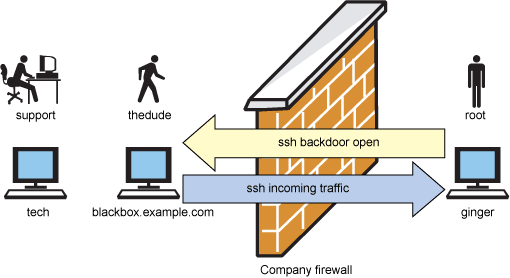
In our example, we'll call our machine blackbox.example.com. The machine behind the company firewall is called ginger. Finally, the machine that technical support is on will be called tech. Figure 4 explains how this is set up.

Figure 4. Poking a hole in the firewall
 

Here's how to proceed:
  1. Check that what you're doing is allowed, but make sure you ask the right people. Most people will cringe that you're opening the firewall, but what they don't understand is that it is completely encrypted. Furthermore, someone would need to hack your outside machine before getting into your company. Instead, you may belong to the school of "ask-for-forgiveness-instead-of-permission." Either way, use your judgment and don't blame me if this doesn't go your way.

  2. SSH from ginger to blackbox.example.com with the -R flag. I'll assume that you're the root user on ginger and that tech will need the root user ID to help you with the system. With the -R flag, you'll forward instructions of port 2222 on blackbox to port 22 on ginger. This is how you set up an SSH tunnel. Note that only SSH traffic can come into ginger: You're not putting ginger out on the Internet naked.
    You can do this with the following syntax:
    ~# ssh -R 2222:localhost:22 thedude@blackbox.example.com
    Once you are into blackbox, you just need to stay logged in. I usually enter a command like:
    thedude@blackbox:~$ while [ 1 ]; do date; sleep 300; done
    to keep the machine busy. And minimize the window.
  3. Now instruct your friends at tech to SSH as thedude into blackbox without using any special SSH flags. You'll have to give them your password:
    root@tech:~# ssh thedude@blackbox.example.com .
  4. Once tech is on the blackbox, they can SSH to ginger using the following command:
    thedude@blackbox:~$: ssh -p 2222 root@localhost
  5. Tech will then be prompted for a password. They should enter the root password of ginger.

  6. Now you and support from tech can work together and solve the problem. You may even want to use screen together! (See Trick 4.)

To close the door after use:
On ginger shell, locate the ssh process and kill it.
i.e.
$ ps -ef | grep ssh
$ kill [pid]

Save data with has_many :through on Rails

The key is to put "attr_accessible" on the join model.

class Physician < ActiveRecord::Base
  has_many :appointments
  has_many :patients, :through => :appointments
end

class Appointment < ActiveRecord::Base
  belongs_to :physician
  belongs_to :patient

  attr_accessible :physician_id, :patient_id
end

class Patient < ActiveRecord::Base
  has_many :appointments
  has_many :physicians, :through => :appointments
end

Directory size statistics for windows

WinDirStat - http://sourceforge.net/projects/windirstat/
TreeSize Free - http://www.jam-software.com/freeware/index.shtml
JDiskReport - http://www.jgoodies.com/freeware/jdiskreport/
VirDir - http://www.sb-software.com/visdir/

Sunday, September 30, 2012

Collaboration Practice - Pushed code should be cleaner than it was pulled

Clean up rubbish inside the codes when seen, no matter who left the rubbish there.  A little improvement on every check-in, it make a different over time.

However, be very careful and make sure it is really a rubbish before clean it up.

Coding practice - Keep things simple


  • Good readability - Minimize the time it takes for people who understand your code.
  • Easy to maintenance
  • Easy to understand
  • Learn from open sources, for free!  (Rails gem is a good source for Ruby developers.)
  • No matter how complex a system be, each module and building block can be kept as simple as possible.
  • Each object response for a simple functionality.  
  • Each single function can be unit tested.
  • Keep method size as short as possible.  Say, 5~10 lines.
  • Beautiful code comes from simplicity.
  • DRY - Don't repeat yourself.
  • Do NOT repeat any single business logic on different methods.
  • Before adding a new method or logic, check whether its already implemented in the system.  Reuse or create a wrapping function base on it.

Coding practice - Standardise coding styles

A good coding style can increase readability.  So,
  • Keep a consistent coding styles within development team.
  • Automate the style checks.

Design practice - Observe end user behaviors

The best way to improve system user experience is to observe how users use the system.

Observing user behaviors is better than imagining them.

Showing tool tip is better than creating help pages or user manual. Users will always focus on what they are doing and look for help within small area on UI for the solution.

Development practice - Repay technical debts, Quick!

"Do it good" or "Do it quick"? If no time pressure, always choose "Do it good".

But time pressure may always force you to choose "Do it quick".

When coding in "Do it quick", technical debts will be created and which grows as time pass.

The way to handle "Do it quick" nicely is by adding "technical debts" fix items on development schedule. Repay them as quickly as possible.

Saturday, September 29, 2012

Practical Patterns on Ruby - Singleton

require 'singleton'
class Schedule
    include Singleton
    ...
end

Schedule.instance.[some_method]


Replace mechanize gem by selenium webdriver

Some years ago, the Mechanize gem was used by quite a lot of Ruby developers to exact web contents for testing or other uses.

However, the down side of Mechanize is that it cannot get delayed contents from AJAX. Selenium webdriver came to solve the problem.

The Selenium driver will launch a browser to simulate real user interaction with the target web site.  So, the AJAX and other contents can be easily found using the selenium driver APIs.

http://seleniumhq.org/

Friday, September 28, 2012

Debug rake task

($ gem install ruby-debug)
$ (bundle exec) rdebug rake db:migrate --trace

Chef

Chef is a systems integration framework, built to bring the benefits of configuration management to your entire infrastructure.

http://wiki.opscode.com/display/chef/Home

Google BigQuery - Interactive analysis

Google BigQuery is a web service that lets you do interactive analysis of massive datasets—up to billions of rows. Scalable and easy to use, BigQuery lets developers and businesses tap into powerful data analytics on demand.

https://developers.google.com/bigquery/

Modern QA role on Agile SDLC


Most people in the industry are undoubtedly familiar with the Software Development Lifecycle (SDLC).
Reference: Wikipedia
I was having lunch with a recruiter colleague, and I was learning about the QA requests from lots of customers.  Most defined the QA role well within the “Testing” oval as shown in the picture.  From my questioning, it appears that the agile movement has done little to alter this SDLC.  In fact, this process is still alive and very will, even within agile teams.  The difference is in the batch size.  Rather than doing analysis on a batch of 50 features and then moving that full batch to design, the agile movement has reduced that batch size considerably, and in some cases reduced it down to a batch size of 1.  Lean agile teams are likely to use a batch size of 1 and continuously pull features through the lifecycle.  As an aside, I find that even when working on a single feature, this cycle is still in play, although the feature is more likely to jump backward and redo a portion of the phase before if new information is found.
The reason for the reflection on QA is that my recruiter colleague still predominantly  receives requests for QA folks to fill the roll of the testing phase.  This means that the QA involvement happens after analysis, after design, after implementation, and only when defects can no longer be prevented.  They can only be discovered.  Inspectors at the end of an assembly line are powerless to prevent defective parts.  They can only discover them through inspection and serve a Quality Control role to prevent defective parts from being shipped.  The same is true in software, and many others have written the same.
I shared a very successful project where we incorporated what would otherwise be a very traditional QA Manager into an agile process and yielded great results and a very low defect rate.  When crafting the team’s process, the QA Manager worked in between the analysis and design phases of a given feature to understand and then define the test cases.  That is, based on the current understanding of the feature, how will we test it?  The work required to create the test cases was sufficient to find analysis gaps early and force them to be filled.  The additional information and context contained in the test cases added the design activity as well and yield, in my opinion, a more robust design that was less prone to defects of oversight.  In this project, we saw the time spent coding reduced to less than 50% of the overall project effort.  In fact, at the beginning of the project, programmers were about 50% of project staff, and half-way through, the programmer staff had been reduced to 1/3 of overall project staff.  By crafting a process that pulled thoughts of QA to the beginning of the process, we modified the environment to one in which it was hard for defects to be created in the first place.  In the end, we found no need to create a defect tracking database, and the team was applauded for its quality.  The production launch, which always carries some risk, was a trivial affair, and the system is currently being used by many to perform their daily job.
Our industry stills see QA not as assuring quality, but merely controlling quality through inspection.  Some savvy development managers already have changed traditional QA job descriptions, but there is a long way to go before these notions reach the mainstream of the industry.
What are your experiences with QA?

Thursday, September 27, 2012

Resources on Shell Script

http://linuxconfig.org/Bash_scripting_Tutorial
http://www.freeos.com/guides/lsst/index.html
http://tldp.org/LDP/abs/html/
http://nmc.nchu.edu.tw/linux/shell_lspace.htm
http://arachnoid.com/linux/shell_programming.html
https://sites.google.com/site/tiger2000/home
http://linux.vbird.org/linux_basic/0340bashshell-scripts.php
https://developer.apple.com/library/mac/#documentation/opensource/conceptual/shellscripting/Introduction/Introduction.html
http://linuxcommand.org/writing_shell_scripts.php

Rails customize has_and_belongs_to_many join table name

has_and_belongs_to_many ..., :join_table => '[Join table name]'

In addition, to change foreign key names, use

:foreign_key => '...'
:association_foreign_key => '...'

Rails database migration for new/addition has_many or has_and_belongs_to_many relation

To add a new relation to ModelOne: has_many ModelTwo:
Then, ModelTwo needs a new model_one_id column

To add a new relation to ModelOne: has_many_and_belongs_to Model_Two:
Then, New table model_ones_model_twos [model_one_id, model_two_id]

$ rails generate migration CreateTableModelOnesModelTwos

class CreateTableModelOnesModelTwos < ActionRecord::Migration
  def up
    create_table 'model_ones_model_twos', :id => false do |t|
      t.integer :model_one_id
      t.integer :model_two_id
    end
  end

  def down
    drop_table 'model_ones_model_twos'
  end
end

The :id=>false here is for turning off automatic add primary key column.

Bash process find result

find . -name '*.txt' | while read line; do
    echo "Processing file '$line'"
done

e.g.
find . -name '*T&C*.pdf' | while read orig_file do 
  new_file=`echo $orig_file | sed 's/[/]/_/g'`
  cp $orig_file $new_file 
done

Access shared network folder on Mac bash

1. In Finder, locate the folder that to be accessed.
2. In Finder preference -> General -> Check 'Connected Servers'.
3. The folder icon should be added to desktop.
4. $ cd /Volumn/[Folder Name]

Selenium driver find parent element

element.find_element(:xpath, "..")

Rails has_and_belongs_to_many fixture

car.rb
class car
    has_and_belongs_to_many :owners
    ...
end


owner.rb
class owner
    has_and_belongs_to_many :cars
    ...
end


owners.yml
me:
    cars: swift_sport, s2000

not_me:
    cars: swift_sport


cars.yml
s2000:
    owners: leoo

swift_sport
    owners: me, not_me

Wednesday, September 26, 2012

Git Learning Resources

Nice and clean!

http://learn.github.com/p/intro.html
http://learn.github.com/p/setup.html
http://learn.github.com/p/normal.html
http://learn.github.com/p/branching.html
http://learn.github.com/p/remotes.html
http://learn.github.com/p/log.html
http://learn.github.com/p/rebasing.html
http://learn.github.com/p/undoing.html
http://learn.github.com/p/git-svn.html

Membership and Role for Ruby on Rails

devise gem: https://github.com/plataformatec/devise
omniauth gem: https://github.com/intridea/omniauth

What is Rack?

"Rack provides a minimal, modular and adaptable interface for developing web applications in Ruby. By wrapping HTTP requests and responses in the simplest way possible, it unifies and distills the API for web servers, web frameworks, and software in between (the so-called middleware) into a single method call."

Introducing Rack:
Examples:

Resources: